InterServer review:best hosting ?
- zazoui abdou
- 4 oct. 2021
- 7 min de lecture

In this InterServer review, I’ll take a very detailed look into this web hosting underdog. I’m going to analyze its plans and prices, ease of use, performance, security, and customer support. No stone will be left unturned.
InterServer is not your usual hosting provider. It’s not a big name in the industry, and nobody is really talking about it. It’s more of an underdog, except that no one is getting upset if InterServer wins at something. They’re… Surprised more than anything.
The biggest surprise of all is that even if people don’t really acknowledge InterServer, the provider is 21 years old. So, how did it make it for so long without any notable marketing campaigns?
Was it word of mouth? It must have something up its sleeve, right?
All the InterServer.net reviews I read created a positive image. It seems that InterServer is a really good provider. Or, this is among the most well-kept conspiracies of all time. Its website says that 70% of the customers are migrations, so there has to be a reason for that.
My goal today is to find out what is InterServer hiding under its servers.
Lots of testing and analysis made this post quite long. I know you’re busy, so here’s a chance to skip straight to the verdict.
⭐Rating:
4.0★★★★☆
💵Price:
Prices start at $2.50/mo with a special discount▶️ Uptime:
99.99%🏘️ Hosting types:
Shared, VPS, ASP.NET, dedicated, collocations🌎 Server locations:
Secaucus, NJ and Los Angeles, CA👨💻 Support:
24/7 ticket system, email, live chat, and phone🔥Coupons:
Pros and Cons of InterServer
Pros
Affordable month-to-month pricing
Free SSL, weekly backups, and malware protection
99.99% uptime result
Classic cPanel interface
Cons
Customer support can be hit-and-miss
Account interface is outdated
InterServer pricing
InterServer pricing starts at $2.50/mo for shared hosting. However, this company provides every type of hosting in its own operated data centers. You can choose ASP.NET hosting, cheap VPS, dedicated servers, collocations, or data storage options.
Hosting typeBest forShared hostingBeginners looking for ease of use and low prices. Get InterServer, now 65% OFF!ASP.NET hostingHosting using Windows interface.VPS hostingAn advanced hosting with dedicated server space.Reseller hostingFor agencies, freelance developers or designers looking to sell websites.Dedicated hostingAdvanced solutions. You get a private server with all its resources and management responsibilities.Collocations hostingRenting datacenter space for your own servers. Ensures security and redundancy.
It would seem that most of InterServer’s solutions are meant for advanced users. However, shared hosting is by far the most used option as it can support both websites that are just launched and medium-sized businesses.
For a very long time, InterServer had only one shared hosting plan that was unlimited in every sense – number of websites, email accounts, storage, and bandwidth.
*Keep in mind that unlimited is very much limited by the server capacity itself.
Anyway, to serve a bigger pool of people, InterServer now has 3 shared hosting packages. All of them come with the same features like free domain registration, unlimited storage space, bandwidth, and email accounts, as well as a possibility to connect unlimited domains.
However, with more expensive plans, you get more server resources such as CPU cores and RAM.
PlanFeaturesPriceStandard1 CPU core and 2GB SSD storage$2.50/moBoost 22 CPU cores and 4GB SSD storage$9.95/moBoost 44 CPU cores and 8GB SSD storage$19.95/mo
So picking the best plan comes down to the size of your project and its needs:
Standard – best for small websites such as informational sites, portfolios, or even very small online stores.
Boost 2 – great for bigger sites. You should easily be able to host a small online store on this one.
Boost 4 – an option for popular sites and people who need both ease of use and power. It can support larger online stores.
Best Value With the current deal, it’s best to pick InterServer with 1-year in-advance payment. This way, the total will be just $30 and it will renew at $84 for every year after that. Get InterServer
But that’s not all. The extra stuff provided in every single plan for free is just impressive:
Global content caching.
SSL certificates.
Professional website migration.
InterShield security package.
Weekly automatic backups.
Inter-Insurance – a free service that restores your website in case of an attack.
Can you believe that all this comes for just $2.50 a month? Better yet, the increased renewal rates aren’t too steep either. The additional features and server resources offered are almost too good to be true for such a low price. Can’t blame them for wanting to get better returns on that.
But, let’s say you tried it and didn’t like it. What then?
Since the provider comes with a 30-day money-back guarantee, you can request a full refund within said 30 days of your purchase, no questions asked.
Check out all available InterServer coupon codes to snatch the best prices!
All in all, InterServer pricing is good. Almost too good. And it’s a great option for every user – you can choose monthly billing if your budget is tight or pre-pay to enjoy a discount for longer.
Hosting management – is it easy to use?
Using InterServer is as easy as it can possibly be. If you purchase a domain, it’s automatically activated, and the SSL certificates are pre-installed. Plus, installing WordPress (or any other content management system, for that matter) is a piece of cake. You just have to use the Softaculous installer located in cPanel. However, some strings are attached.
Right off the bat, you’ll notice that design and user experience are not the focus of this company.
This is the first window you’d see upon the first login. It’s the user management area where you can see what hosting accounts and domains you own.
The top menu bar is not very useful. It lists all the services that you can buy. The 3 buttons you’d actually use from there are Billing, Settings, and Support.
On the other hand, the main area works as navigation for reaching web hosting services and domains that you bought with InterServer.
If you’d click on your domain name that’s listed under Web Hosting, you’d reach the hosting management area.

The web hosting management interface is not much better. Loads of information and details but the one and only thing that interests us is down below. It’s the Login to cPanel button. It’s one of the very few things that you’ll use from this interface.
Talking about cPanel, this is where I start liking InterServer.
What does the InterServer control panel look like?
InterServer uses cPanel, and it is as standard as hosting control panels can get. Unfortunately, fewer and fewer companies are offering it nowadays. Reason? cPanel got so successful that it started increasing pricing by day. Uh-oh. Everyone can be replaced.
Nonetheless, InterServer still has cPanel.
It’s a well-organized interface with all the tools that you’ll need to set up and manage a successful website. That includes adding a domain, webmail account, installing WordPress, or editing files in the File Manager.
cPanel is very beginner-friendly as most of the tools you’ll need come with built-in explanations. Also, the knowledge bases are full of tutorials too. Promise, you won’t get lost.
So apart from the very outdated look, InterServer is nothing but easy to use.
Shall we get into specifics?
How to install WordPress on InterServer?
WordPress installation with InterServer is easy and takes just a couple of minutes. It has 3 steps involved – finding Softaculous in the cPanel, choosing the WordPress app, and filling out the installation form.
Let me quickly show you how everything looks and where to find it.
To find the Softaculous Apps Installer, you’ll need to scroll down cPanel a bit. It will be under the Software tab. Alternatively, you can use WordPress Manager by Softaculous. This way, you’ll save a couple of clicks.
No matter if you chose Softaculous or WordPress Manager, WordPress is the first option available. By the way, this is the place where you can find all the available apps if WP is not your first choice.
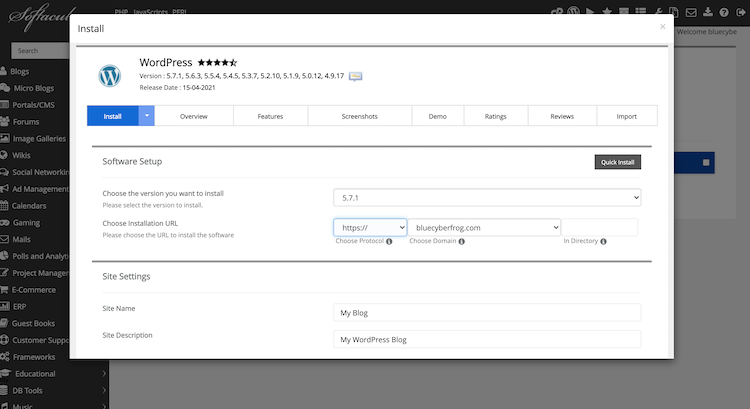
The installation window can look intimidating for all the details asked, but it’s actually super simple. All you’ll need to enter or choose is – your domain name, user name, and password. The rest can be left as “default.”
Once you’re done entering the details, simply click one of the blue Install buttons. One is at the top of the window, and one is at the bottom. As simple as that.
How to create a professional email with InterServer?
One of the key things for a successful brand is a professional email, and that is very simple to set up with InterServer. All you’ll have to make sure of is that you have a working domain name.
So to get that nice yourname@yourwebsite.com instead of yourname9999@gmail.com email address, find the Email tab in the cPanel.
As you can see, there are a lot of tools here for email management. You can customize autoresponders, create mailing lists, and even track the deliverability. However, to create and reach your email account, you’ll need the first one – the Email Accounts module.
You can also set the storage space limit or keep it unlimited – whichever floats your boat. Just click on Create once you’re done, and your mailbox will be ready.
One thing to note is that InterServer uses just the most basic email clients like RoundCube. They are good for day-to-day mailing but will not suffice the needs of serious email marketing campaigns.
All in all, InterServer is easy to use, and day-to-day tasks like installations or email management are done in a matter of seconds. While interfaces could be prettier, I have no actual complaints regarding usability and functionality.
Performance – is InterServer fast?
Just like everything in this InterServer review so far, the performance is also very much standard. InterServer shows very reliable 99.99% uptime, average server speed, and quite impressive website loading time when put under pressure.
To see how InterServer performs, I ran it through multiple tests involving reliability monitoring, speed testing, and putting the provider under some stress.
InterServer uptime and response time
Long-term performance monitoring results are both great and average. The uptime stayed at 99.99%, which is amazing. Barely an hour of downtime is expected in a year, and that’s basically the best you can expect from any server.
This result is even more appreciated when considering the provider's official SLA uptime guarantee of 99.9%.
InterServer review – the final verdict
All things of this InterServer hosting review considered, it left a good impression. It may not be a popular choice, and at this point, I don’t understand why. It’s more than capable, and the facts should speak for themselves.
So, here’s the gist of what it means to have your website(s) hosted by InterServer.


Commentaires